
Overview
Event log management is a crucial aspect of maintaining security and accountability in access control systems.
This guide will explore how to effectively manage event logs on Suprema devices using both the BioStar Device SDK and Suprema G-SDK.
1. Event Log Overview
For event code definitions and descriptions in the BioStar Device SDK, refer to the BS2Event documentation.
You can also find the definitions in BS2Event.h included in the BioStar Device SDK package, or in the BS2EventCodeEnum and BS2SubEventCodeEnum enumeration in SFEnum.cs for the C# sample.
For Suprema G-SDK, refer to the Event API documentation. The sample code also includes event_code.json, which maps event codes and subcodes to their descriptions.
BioStar Device SDK: https://kb.supremainc.com/bs2sdk/doku.php?id=en:log_management_api
Suprema G-SDK: https://supremainc.github.io/g-sdk/api/event/
2. Managing Event Logs with BioStar Device SDK
Part 1. API Call
BioStar Device SDK and Suprema G-SDK provides a high-level interface for managing event logs across multiple devices from a centralized server.
[Retrieving Event Logs]
There are two main ways to receive logs from the device using the SDK:
- Requesting logs from the device.
BioStar Device SDK: https://kb.supremainc.com/bs2sdk/doku.php?id=en:bs2_getlog
Suprema G-SDK: https://supremainc.github.io/g-sdk/api/event/#getlog - Receiving real-time monitoring logs.
Device SDK: https://kb.supremainc.com/bs2sdk/doku.php?id=en:bs2_startmonitoringlog
Suprema G-SDK: https://supremainc.github.io/g-sdk/api/event/#enablemonitoring - Requesting filtered logs from the device.
[Deprecated] Article: [Both SDKs] Why has the Device Log Filtering API GetLogWithFilter Been Deprecated?
[Deleting Event Logs]
All logs on the device will be deleted. There is no API to delete logs partially.
BioStar Device SDK: https://kb.supremainc.com/bs2sdk/doku.php?id=en:bs2_clearlog
Suprema G-SDK: https://supremainc.github.io/g-sdk/api/event/#clearlog
Part 2. Event Log Structure
In this part, explain the common structure of the event logs.
1. ID
Log record ID which automatically increases from 1 when the log is generated.
- If you know the first and last logs, you can know how many logs are stored on the device.
[Check the initial logs stored on the device using the Device SDK]
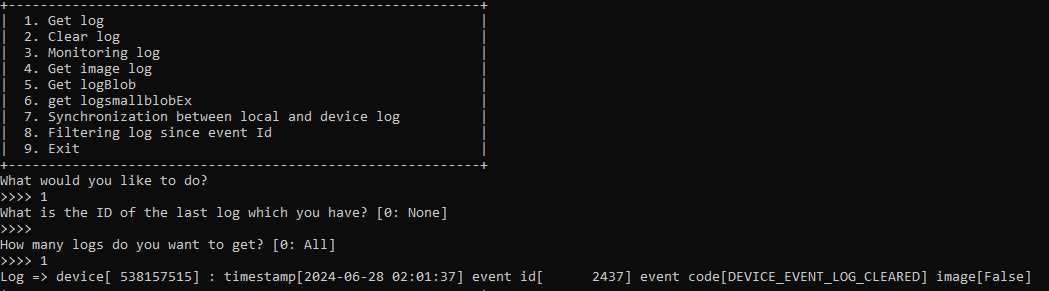
As you can see in the photo, the logs prior to 2437 have been deleted.
There is no API to get the last log index(ID).
2. dateTime (Unix time format)
The time when the log has been generated. It means the seconds past from UTC until the current time.
3. deviceID
ID of the device that generated the log.
4. eventCode
The event code consists of a main code and a sub code.
The rest of data varies depending on the event type. Please refer to the SDK documentation for more details.
3. Tips for managing Event Logs
It is recommended that logs be received in bulk from the device using the GetLog API, and that logs occurring after the current time be received in real time using the EnableMonitoring and SubscribeRealtimeLog APIs, so that the server stores all logs in an appropriate DBMS and filters the logs from the DBMS.