
Core Requirement: Device ID Registration
To ensure normal operation, all Suprema devices must complete the license registration process.
The essential requirement for the Suprema device license is that the Device ID of each unit must be registered within the license server system.
Once you provide the IDs of the devices you wish to use to the license manager, they will undergo server registration and activation.
This step is mandatory because the Device ID information registered on the license server synchronizes directly with the Gallagher Integration server.
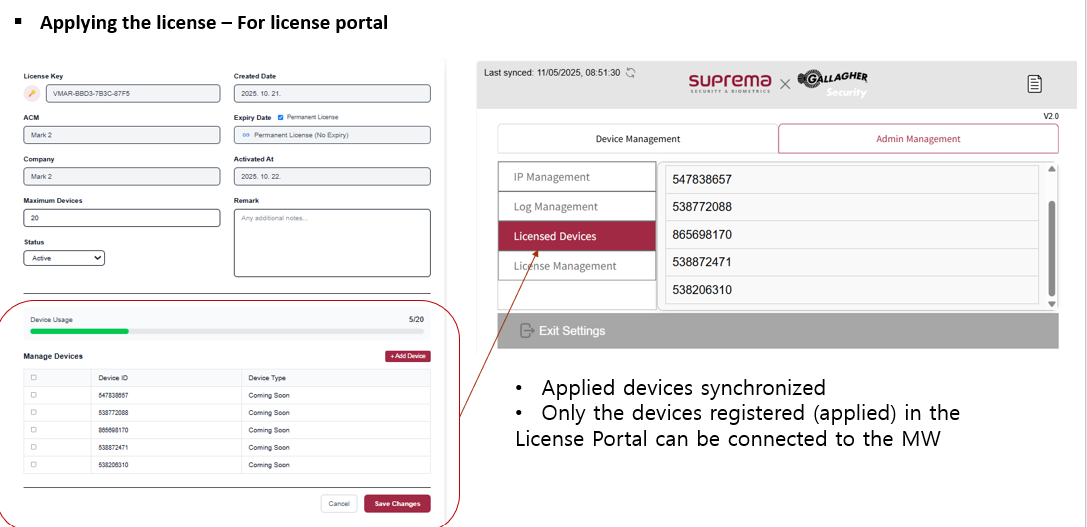
Only devices that are registered and applied in the License Portal can successfully connect to the Middleware (MW).
Critical Notice for Offline Environments
Special caution is required when operating in an offline environment.
For offline setups, you must provide the IDs of all Suprema devices intended for use to the license manager in advance.
A Gallagher integration offline license will only be issued if it includes those specific device IDs.
All devices will function correctly only after this comprehensive offline license has been applied to the system.
System Integration Summary
Device Management: You can monitor and manage specific units under the "Manage Devices" section of the portal.
Synchronization: Applied devices are synchronized to ensure the middleware recognizes the authorized hardware.
Verification: You can verify the "Device Usage" count (e.g., 5/20) to see how many slots are occupied by registered IDs.