
Issue Description
Access Granted events are not displayed in the Monitoring view after access is granted at the device.
1. Plugin Reactivation (Mandatory After Initial Installation)
Description
After the initial installation of the plugin, a plugin reactivation is mandatory.
If reactivation is skipped, required .dll may not be properly registered, causing access events to be missing in Monitoring.
Action
Open Config Tool
Navigate to Plugins
Deactivate the plugin
Reactivate the plugin
Restart related services if required
Key Note
This step is required at least once after first installation, even if the plugin appears to be running normally.
2. Card Format Setting (Critical for Event Mapping)
Description
Cloud Link communication and Access Granted event transactions are established during card format configuration.
If the card format is not configured correctly, access events will not be generated or mapped to Monitoring.
Action
Verify that the correct Card Format is configured in the plugin
Path: Config Tool _ Tasks _ Suprema Plugin Configuration
Reapply or re-save the card format settings if changes were made
Key Note
Event transaction binding occurs at the time of card format setup.
Incorrect or missing card format settings will prevent Access Granted events from appearing.
3. Monitoring Entity Configuration (Security Desk)
Description
Access events are displayed in Monitoring only for entities that are explicitly added to the Monitoring scope.
If the target Door or Area is not included, Access Granted events will not appear even if they are generated correctly.
Action
Open Security Desk
Go to the Monitoring tab
At the bottom panel, click Monitoring
Confirm that the relevant Door or Area is added
Add the Door or Area if it is missing
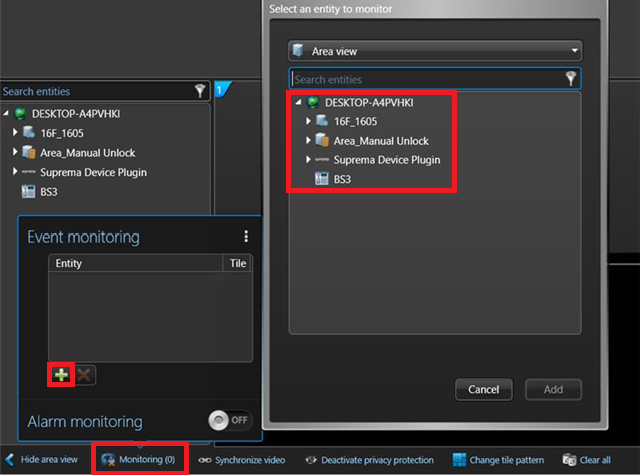
Key Note
Monitoring does not automatically include all entities.
Only entities added to the Monitoring list will display events.
To monitor REX (Request to Exit) or Door Sensor events, the Door entity must be added.
(Adding only the Area entity will not display REX or Door Sensor events.)