
1. Overview
This article provides configuration guidance for Active-Passive architecture on BioStar Server. It applies independently to either a BioStar 2 Server environment or a BioStar X Server environment (not a mixed environment).
These clustering solutions operate at the server/OS level and are not developed by Suprema. For specific supported configurations or questions, please contact Suprema Technical Support.
2. Failover Configuration Methods
2.1 Windows Server OS
Windows Server supports failover through clustering. All devices connect to BioStar 2 or BioStar X Server using the 'Device to Server' mode.
Key points:
- Clustering assigns one virtual IP address (e.g., 192.168.0.3).
- Set the server IP address on all devices to the virtual IP address.
- The clustering system hides and manages the actual IP addresses of Server A and Server B.
- Devices connect to the active server. In this example, Server A (192.168.0.5) is active.
- On failure, Server A switches to stand-by and Server B (192.168.0.4) becomes active.
- The virtual IP address does not change. No device reconfiguration is required after failover.
- Both servers connect to the same database. Data synchronization between the servers is not required.
- Use a database server that is separate from Server A and Server B.
- For virtual servers, use third-party virtualization software such as VMware or Hyper-V.
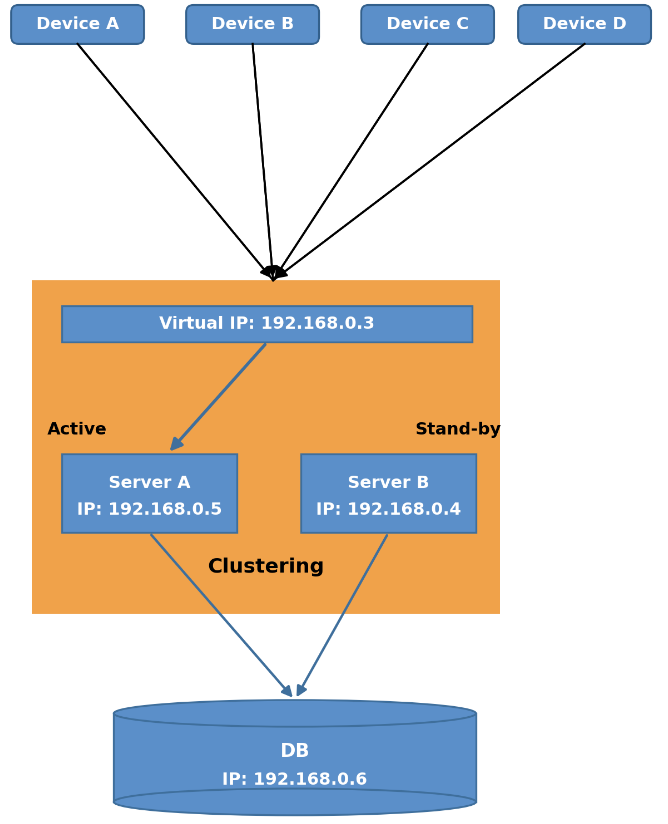
Configuration steps:
- Configure Windows Server Failover Clustering on Server A and Server B.
- Assign a virtual IP address to the cluster (e.g., 192.168.0.3).
- Set the server IP address on all BioStar devices to the virtual IP address.
- Set Server A as Active and Server B as Stand-by.
- Connect both Server A and Server B to the same, separately managed database server (e.g., 192.168.0.6).
- On Server A failure, the cluster automatically fails over to Server B.
- Devices keep operating without any configuration change, since the virtual IP address stays the same.
2.2 Mantech Continuous Cluster Server (MCCS)
MCCS is a third-party clustering software solution (developed by Marathon Technologies) that provides continuous server availability. Suprema is an authorized re-seller of MCCS, and it can be used as an alternative to Windows Server Failover Clustering for Active-Passive failover.
- Contact the Suprema Sales team for system cost.
- Demo Video: https://www.youtube.com/watch?v=TzsBPk0whaA
- Technical Article: https://kb.supremainc.com/knowledge/doku.php?id=en:tc_technology_what_is_failover&s[]=mccs
Note: IP addresses shown in this article are examples only and do not represent actual customer or production IP addresses.