
Updated: 2026-Oct-27
Overview
This article explains how to configure a Wiegand Format in Suprema G-SDK.
Wiegand is a communication protocol for transmitting card data between devices, or between a device and a controller. A Wiegand Format in Suprema G-SDK defines the total bit length, the positions of the Facility Code and Card ID, and the parity rules needed to interpret the data.
To interpret card data correctly, the device needs to be configured with a Wiegand Format that matches the card data in use.
Wiegand Format in Suprema G-SDK
In Suprema G-SDK, the Wiegand Format is configured through WiegandConfig. The following fields are used depending on where the format is applied.
Field | Applies to |
formats | The formats applied when the device itself reads Wiegand cards |
slaveFormats | The formats applied when reading Wiegand data received from an external device |
CSNFormat | The format applied when reading a card's CSN in a Wiegand Format |
For the definition of each field, see the WiegandConfig structure in the Suprema G-SDK Wiegand API documentation.
Note
When CSN cards are read in a Wiegand Format, Wiegand Out follows the Wiegand Format set in CSNFormat. To read and output the CSN in a Wiegand Format, set CardConfig.useWiegandFormat to true. For details, see the CardConfig structure in the Suprema G-SDK Card API documentation.
Configuring a Wiegand Format
This section explains how to configure a Wiegand Format based on the Suprema G-SDK Python Wiegand example code, using the standard 26-bit format as an example. You can configure other formats in the same way by changing the format settings.
The standard 26-bit format consists of the following bits.
Bit Position | 0 | 1-8 | 9-24 | 25 |
Usage | Even Parity | Facility Code | Card ID | Odd Parity |
Defining a Wiegand Format
In a Wiegand Format, the ID and parity fields use bit masks to specify which bits of the card data are used for each field. A value of 1 means the bit at that position is used, and 0 means it is not used.
In the example code, each mask has one element per bit, and the index of each element matches the bit position, so the masks for the 26-bit format contain 26 elements.
The following code defines the standard 26-bit format:
default26bit = wiegand_pb2.WiegandFormat(length=26)
default26bit.IDFields.append(bytes([0, 1, 1, 1, 1, 1, 1, 1, 1, 0, 0, 0, 0, 0, 0, 0, 0, 0, 0, 0, 0, 0, 0, 0, 0, 0])) # Facility Code
default26bit.IDFields.append(bytes([0, 0, 0, 0, 0, 0, 0, 0, 0, 1, 1, 1, 1, 1, 1, 1, 1, 1, 1, 1, 1, 1, 1, 1, 1, 0])) # ID

evenParity = wiegand_pb2.ParityField(parityPos=0, parityType=wiegand_pb2.WIEGAND_PARITY_EVEN)
evenParity.data = bytes([0, 1, 1, 1, 1, 1, 1, 1, 1, 1, 1, 1, 1, 0, 0, 0, 0, 0, 0, 0, 0, 0, 0, 0, 0, 0])

oddParity = wiegand_pb2.ParityField(parityPos=25, parityType=wiegand_pb2.WIEGAND_PARITY_ODD)
oddParity.data = bytes([0, 0, 0, 0, 0, 0, 0, 0, 0, 0, 0, 0, 0, 1, 1, 1, 1, 1, 1, 1, 1, 1, 1, 1, 1, 0])

default26bit.parityFields.append(evenParity)
default26bit.parityFields.append(oddParity)
To define a Wiegand Format, set the following fields:
- length: The total bit length of the format. In the example above, it is set to 26.
- IDFields: The bit masks for the Facility Code and the Card ID. In the example above, the Facility Code uses bits 1-8 and the Card ID uses bits 9-24, so each mask sets those bits to 1. Up to 4 IDFields can be configured.
- parityFields: The parity type, the parity bit position, and the bit mask for the bits included in the parity calculation. In the example above, the even parity bit at position 0 is calculated over bits 1-12, and the odd parity bit at position 25 is calculated over bits 13-24, so each mask sets those bits to 1. Up to 4 parityFields can be configured.
Field | Description |
parityType | Specifies the parity type (ODD/EVEN). |
parityPos | Specifies the position of the parity bit itself. |
data | Specifies the bits of the card data included in the parity calculation. |
Applying the Format to the Device
Append the defined format to WiegandConfig.formats and call the SetConfig API. You can then use the GetConfig API to verify that the Wiegand Format has been applied correctly.
The following screenshot shows the output of the test.py file in the Python Wiegand example code. The test.py file runs the example, while the format definition and the calls to the SetConfig and GetConfig APIs are implemented in the testConfig.py file.
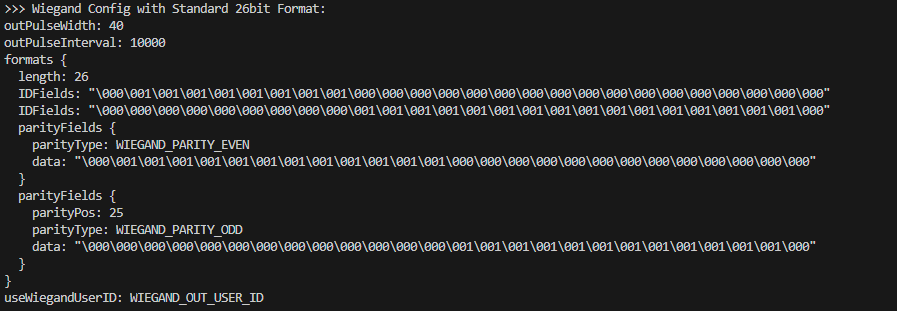
For the full example code in Python, see the Python Wiegand API Tutorial.
Configuring Multiple Wiegand Formats
A single device can use multiple Wiegand Formats. To apply them, add all formats to the same formats list and call the SetConfig API once.
This example uses the 26-bit and HID 37-bit formats defined in the example code.
Note
The example code applies each format with a separate call to the SetConfig API. To apply multiple Wiegand Formats, modify the example code to add all formats to the same formats list before calling the SetConfig API.
The following screenshot shows the output of the test.py file after the example code is modified as described in the Note above.
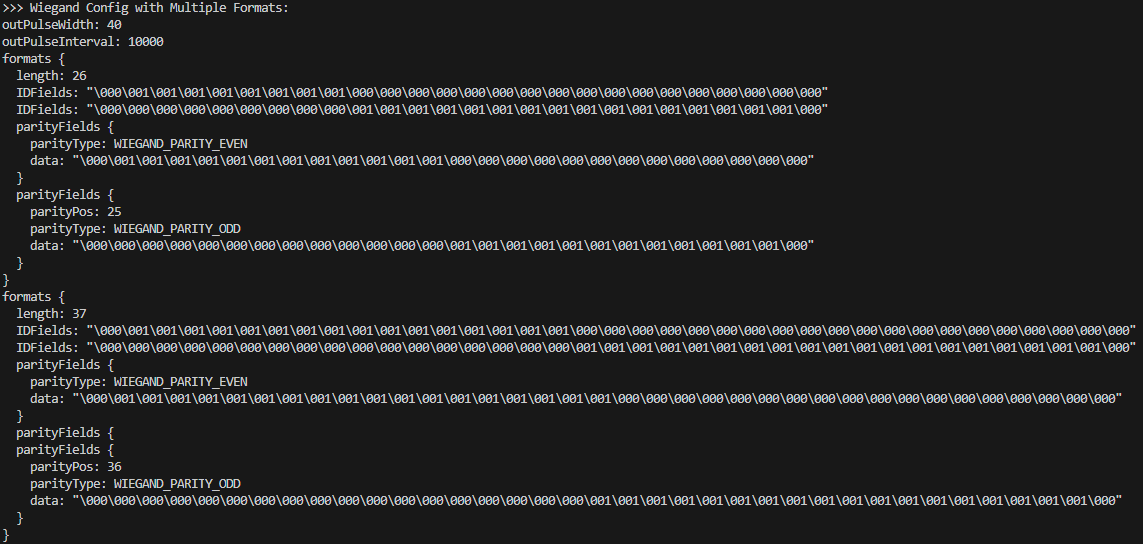
When a card is read, the device first selects the format based on the bit length of the card data. If multiple formats have the same length, the device identifies the format by its parity rules. If no format matches, the card is not recognized.
For more details, see [BioStar 2] Multiple Wiegand Format / Wiegand Input Configuration / Finding Card Format.
Maximum Number of Formats
Up to 15 distinct Wiegand Formats can be configured in total across formats, slaveFormats, and CSNFormat. CSNFormat can hold only one format. If 16 or more formats are configured, the SetConfig API returns the "Too many wiegand formats" error.
Note
As of G-SDK v1.9.2, the Suprema G-SDK Wiegand API documentation and wiegand.proto state a maximum of 16. This will be corrected to 15 in the next G-SDK release.